TRIPPER HEXARC
Six-voice euclidean sample sequencer
Overview
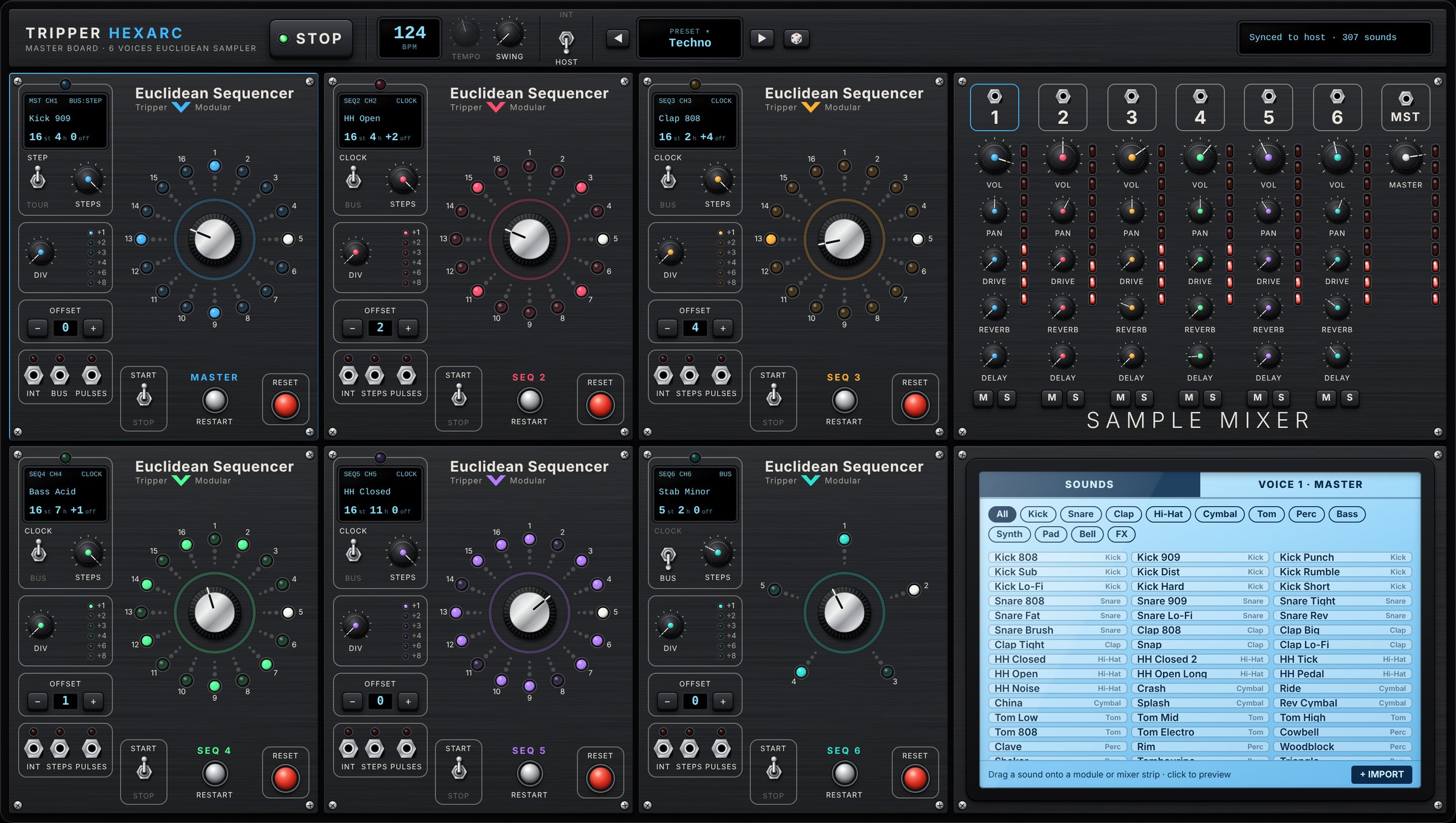
HEXARC is the software edition of the Tripper Euclidean Sequencer hardware: six circular sequencers, one master clock bus, a sample mixer and a touchscreen sound browser, on one panel.
Each sequencer spreads a number of hits as evenly as possible across 1 to 16 steps, the euclidean way. Rings of different lengths, offsets and clock sources run against each other and produce evolving polyrhythms from a handful of controls. In a DAW, HEXARC follows the project tempo and transport and plays its own samples on the instrument track.
Key features
- Six euclidean sequencers, 1–16 steps, hits, offset and manual step editing
- Master sequencer with a pulse bus that drives the other sequencers on every hit (STEP) or every cycle (CYCLE)
- Per-sequencer clock divider ÷1 to ÷8, Start/Stop switch, Restart and Reset buttons
- 307 built-in sounds in 12 categories, plus your own samples up to 30 seconds
- Six-strip mixer: volume, pan, drive, reverb and delay sends, mute, solo and LED meters
- Per-voice pitch, filter, length, probability, reverb size, tempo-synced delay and feedback
- Follows your DAW's tempo and transport, or runs on its own clock with swing
- MIDI note output to your DAW, one channel per sequencer
- Everything is saved with the project, sample audio included
System requirements
| macOS | Windows | |
|---|---|---|
| Formats | Audio Unit, VST3, Standalone | VST3, Standalone |
| System | macOS 10.13 or later on Intel macOS 11 or later on Apple Silicon | Windows 10 or 11, 64-bit |
| Processor | Intel or Apple Silicon (universal binary) | x64 |
| Interface engine | System WebKit, built into macOS | Microsoft Edge WebView2, built into Windows 10 and 11 |
| Screen | 1600 × 904 recommended; the window scales down to fit smaller screens | |
HEXARC is an instrument with a stereo output and a MIDI output. It runs in any host that loads AU or VST3 instruments: Logic Pro, GarageBand, Ableton Live, Bitwig Studio, Cubase, Studio One, Reaper, FL Studio and others. Pro Tools (AAX) is not supported.
Installation
macOS installer (recommended)
Open HEXARC-macOS-Installer.zip to extract HEXARC-macOS-Installer.pkg.
Right-click the .pkg, choose Open, then Open again. HEXARC 1.0 is not notarised by Apple, so a plain double-click is blocked the first time.
Follow the installer. Customise lets you choose the components; all three are selected by default.
In Logic Pro, open Settings › Plug-in Manager, select HEXARC and click Reset & Rescan Selection if it does not appear straight away.
| Component | Installed to |
|---|---|
| Audio Unit | /Library/Audio/Plug-Ins/Components/HEXARC.component |
| VST3 | /Library/Audio/Plug-Ins/VST3/HEXARC.vst3 |
| Standalone | /Applications/HEXARC.app |
macOS manual install
Copy HEXARC.component and HEXARC.vst3 into the folders above, or into the same folders in your user Library. Files copied by hand keep the download quarantine: run this once in Terminal, with the path where you copied the plug-in.
sudo xattr -dr com.apple.quarantine /Library/Audio/Plug-Ins/Components/HEXARC.component
sudo xattr -dr com.apple.quarantine /Library/Audio/Plug-Ins/VST3/HEXARC.vst3
Windows
Extract HEXARC-Windows-VST3.zip.
Copy the HEXARC.vst3 folder to
C:\Program Files\Common Files\VST3\.Rescan plug-ins in your DAW. The standalone HEXARC.exe runs from any folder.
To uninstall, delete the files listed above on macOS, or the HEXARC.vst3 folder on Windows.
Quick start
HEXARC opens empty: every sequencer has 16 steps, no hits, no sound and its switch on Stop. A first groove takes six moves.
Start playback in your DAW. With the clock switch on INT, or in the standalone application, click PLAY on the master board instead.
In the touchscreen SOUNDS tab, drag a kick onto sequencer 1, the master. A single click on a sound only previews it.
Turn the large aluminium knob in the centre of the ring to set the hits, for example 4.
Flip the sequencer's Start/Stop switch to Start. The coloured LEDs show the pattern and the white LED follows the playhead.
Do the same with a snare and a hi-hat on sequencers 2 and 3. Use Offset − / + to rotate a pattern, for example 2 hits with offset 4 for a backbeat.
Balance the voices with the SAMPLE MIXER.
To hear a finished groove, click the PRESET display and choose a preset. Loading a preset switches every sequencer to Start.
Using HEXARC in your DAW
Press play in the DAW and every sequencer switched to Start follows the song position.

Loading
Insert HEXARC on an instrument track. In Logic Pro: AU Instruments › Tripper Modular › HEXARC. HEXARC needs no incoming notes; its sequencers make the rhythm.
Clock: HOST or INT
HOST (default)
Tempo and transport come from the DAW. Patterns stay aligned to the bar grid when playback starts mid-song; a loop or a jump in the timeline restarts them from step 1.
INT
HEXARC runs on its own Tempo knob. Press PLAY in HEXARC to start and stop, even while the DAW is stopped: handy for building patterns.
Sound, recording and export
All sound comes out on the instrument track, through the DAW's mixer, effects, automation and bounce. Exports and freezes include HEXARC. Each voice's Output setting chooses internal samples, MIDI or both.
MIDI to other instruments
Each sequencer sends its notes to the DAW on its own channel: sequencer 1 on channel 1 through sequencer 6 on channel 6, note C3 by default. Route HEXARC's MIDI output to another track to play it with a HEXARC rhythm: in Ableton Live set the track's MIDI From to HEXARC; in Bitwig, Reaper and Cubase use the track's MIDI input or a MIDI send. Logic Pro does not pass MIDI from instrument plug-ins to other tracks; there, use the internal samples.
Saving and window size
The project stores every setting and the audio of the six assigned samples, imported ones included, so it reopens and plays identically on another computer. The window opens at the native 1600 × 904, reduced only if the screen is smaller; drag its lower-right corner to resize it. The size is saved with the project.
The panel
The front panel has four areas. Clicking a sequencer module or a mixer strip selects that voice: it gets a coloured frame, and the touchscreen VOICE tab shows its settings.
A
B
C
D
- A
Master board. Play, tempo display and knob, swing, INT/HOST clock switch, presets and random patterns.
- B
Six sequencer modules in two rows. Module 1 is the master and drives the bus.
- C
Sample mixer. Volume, pan, drive, reverb and delay for each voice, mute, solo, meters and the master strip.
- D
Touchscreen. SOUNDS tab to browse, preview and drag sounds; VOICE tab for sound design and MIDI routing.
Sequencer modules
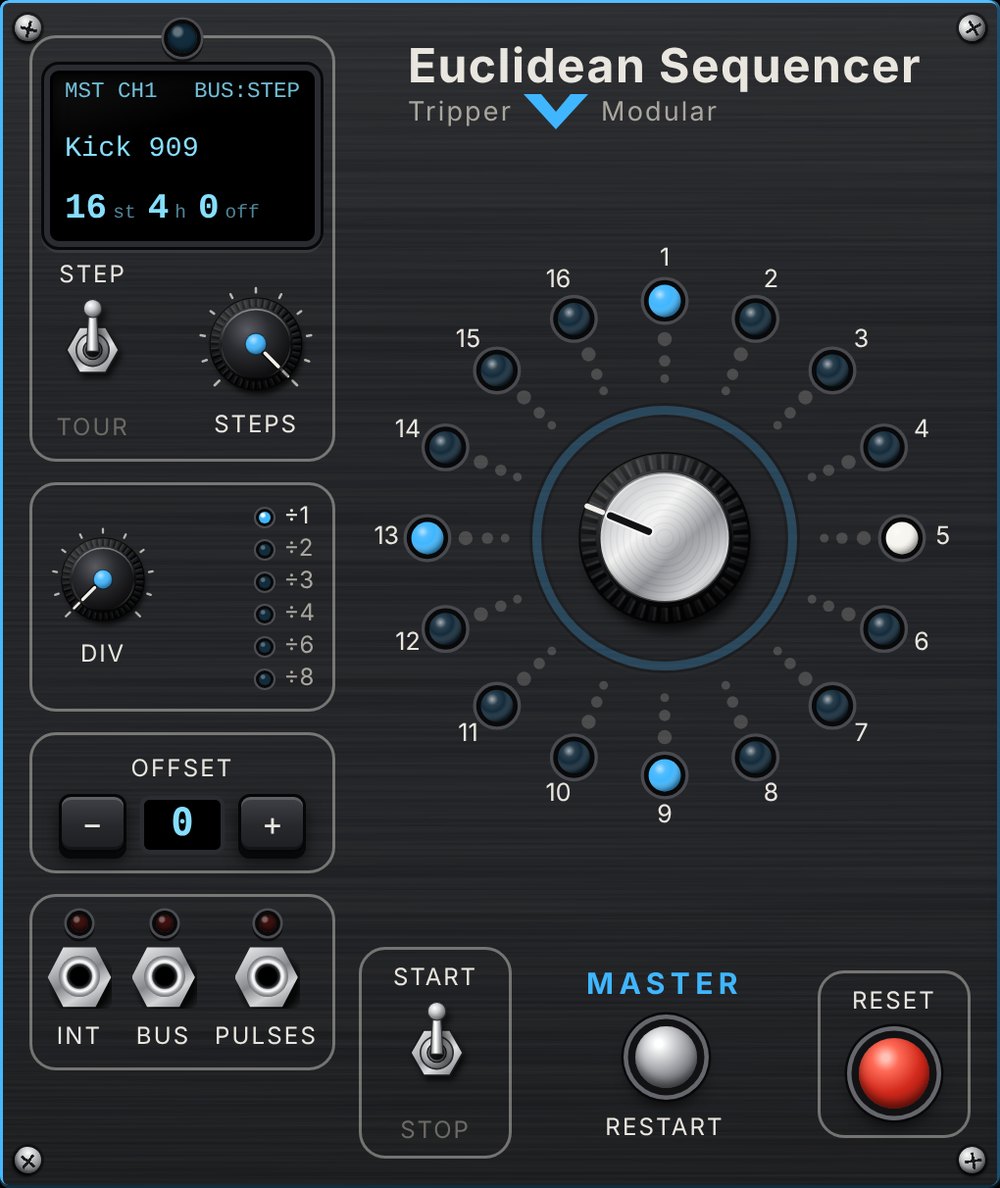
All six modules share the same layout. Module 1, the master, differs only in its source switch (STEP/CYCLE) and its middle jack (BUS).
 1
2
3
4
5
6
7
8
9
10
11
- 1
OLED. Module name, MIDI channel, clock source and divider, sound, then steps / hits / offset. Shows ■STOP when stopped.
- 2
Source switch. Modules 2–6: CLOCK or BUS. Master: STEP or CYCLE bus mode.
- 3
Steps. Pattern length, 1 to 16.
- 4
Div. Clock divider ÷1, ÷2, ÷3, ÷4, ÷6, ÷8; click a value in the list to jump to it.
- 5
Offset − / +. Rotates the pattern one step at a time.
- 6
Activity LEDs. INT once per cycle, STEPS on every step, PULSES on every hit played. On the master, BUS flashes on every bus pulse.
- 7
Step ring. Coloured LED = hit, white = playhead. Click a step to toggle it by hand.
- 8
Hits. Number of hits spread over the steps. The light ring flashes on every hit.
- 9
Start / Stop. Runs or stops this sequencer; Stop silences it at once.
- 10
Restart. Sends the playhead back to step 1 without changing anything.
- 11
Reset. Clears the module back to its start-up state: pattern, sound, routing, mixer and voice settings, switch on Stop. MIDI routing is kept.
Manual step edits last until you change Steps, Hits or Offset, which recalculate the euclidean pattern.
Clock and master bus
Every sequencer advances on one shared step clock, either directly (CLOCK) or through the master's bus (BUS).
Step clock and swing
One step is a sixteenth note. Swing (0–50 %) delays every second step by that fraction of a step.
Divider
Div counts incoming pulses and advances one step every 1, 2, 3, 4, 6 or 8. At ÷4 a 16-step pattern lasts four bars. On the master, Div also slows the bus.
Master bus
- STEP: one pulse on every step where the master has a hit. BUS sequencers then move with the master's rhythm.
- CYCLE: one pulse each time the master starts a new cycle. BUS sequencers then move once per master cycle, ideal for chord changes, pads and fills.
The bus follows the master's pattern, not its sound: a muted master still drives the bus. A sequencer only moves when the transport runs and its own switch is on Start.
Sounds
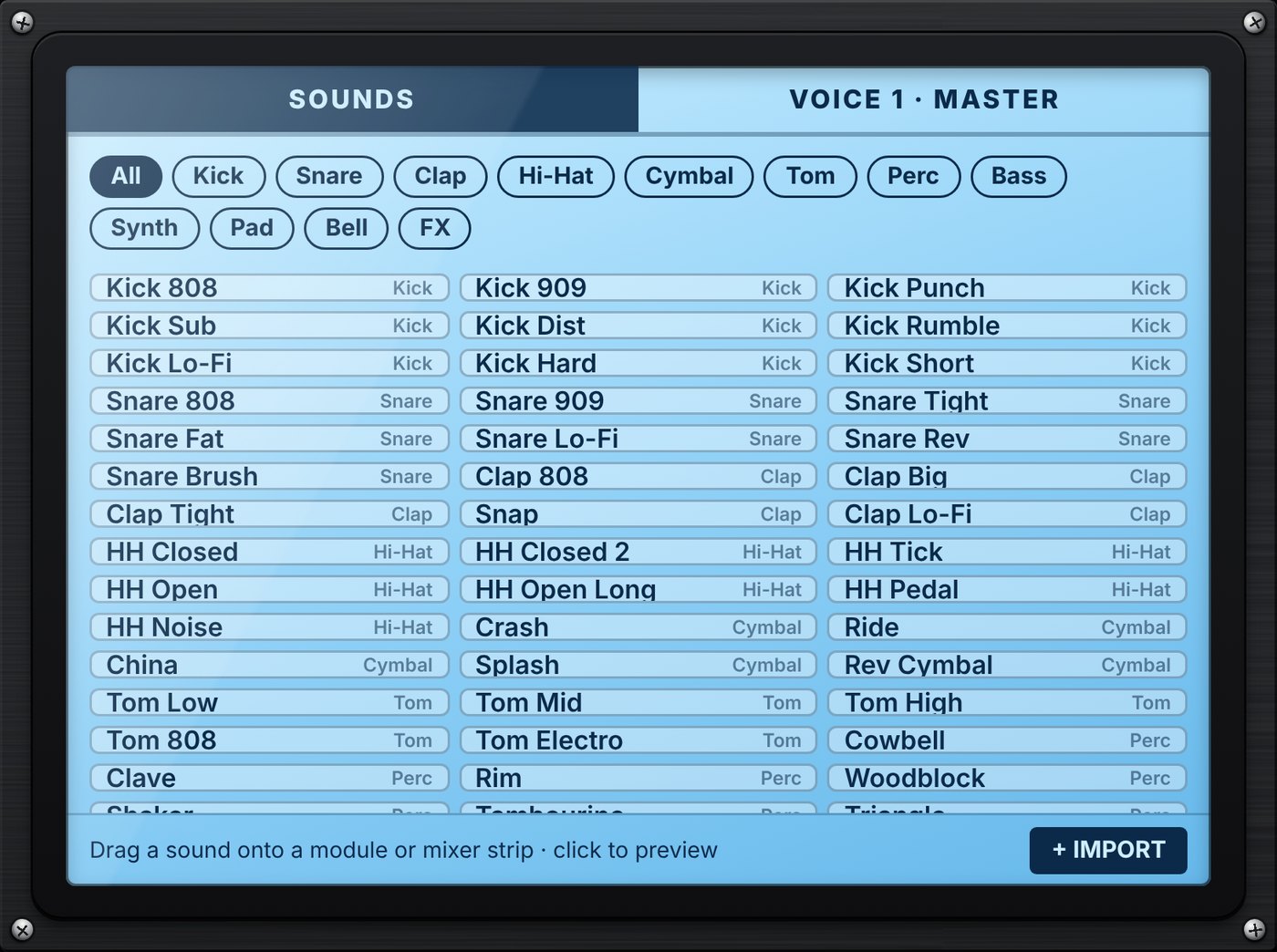
HEXARC ships with 307 sounds synthesised inside the instrument, so nothing extra needs installing. They are generated the first time you use them, and level-matched by category so a full kit is balanced with every fader at the same position.
808, 909, Techno, House, Trap, Gabber, Hardstyle, Dub, Acoustic, Industrial
808, 909, 707, Crisp, Piccolo, Trap, Gated, Room, Dubstep, Rimshot
808, 909, Big, Gospel, Trap, Room, Stack, Snap
808 and 909 closed and open, Half Open, Sizzle, Metallic, Lo-Fi
Crashes, Rides, Ride Bell, China, Splash, Gong, Swell
Floor, Rack, 808, 909, Synth, Disco, Tribal, Roto
Congas, Bongos, Timbale, Tabla, Djembe, Cajon, Guiro, Log Drum, Steel Pan
808 variants, Acid, Reese, Wobble, Growl, Moog, Funk, Dub, Sub
Stabs, Rave, Plucks, Harp, Koto, Leads, Hoover, Chords, Chip
Choir, Air, Sweep, Shimmer, Strings, Drones, Lo-Fi
FM Bells, Glock, Vibraphone, Celesta, Gamelan, Church Bell, Rhodes, Wurli
Risers, Downlifters, Impacts, Sub Drop, Tape Stop, Whoosh, Siren, Glitch
Assigning a sound
- Drag a sound onto a sequencer module or a mixer strip; the voice plays it once to confirm.
- Or choose it in the menu at the top of the VOICE tab.
- A click on a sound previews it; a new preview stops the previous one.
Your own samples
- Drop audio files on a module or strip to load and assign them, or on the touchscreen to add them to the library. + IMPORT and the folder button do the same.
- WAV, MP3, OGG and FLAC; up to 30 seconds per file. Imported sounds appear under Custom.
- Assigned samples are saved inside the DAW project.
Mixer and voice settings
Each voice is shaped in two places: its strip in the SAMPLE MIXER for level, drive and sends, and the touchscreen VOICE tab for sound design and MIDI routing.
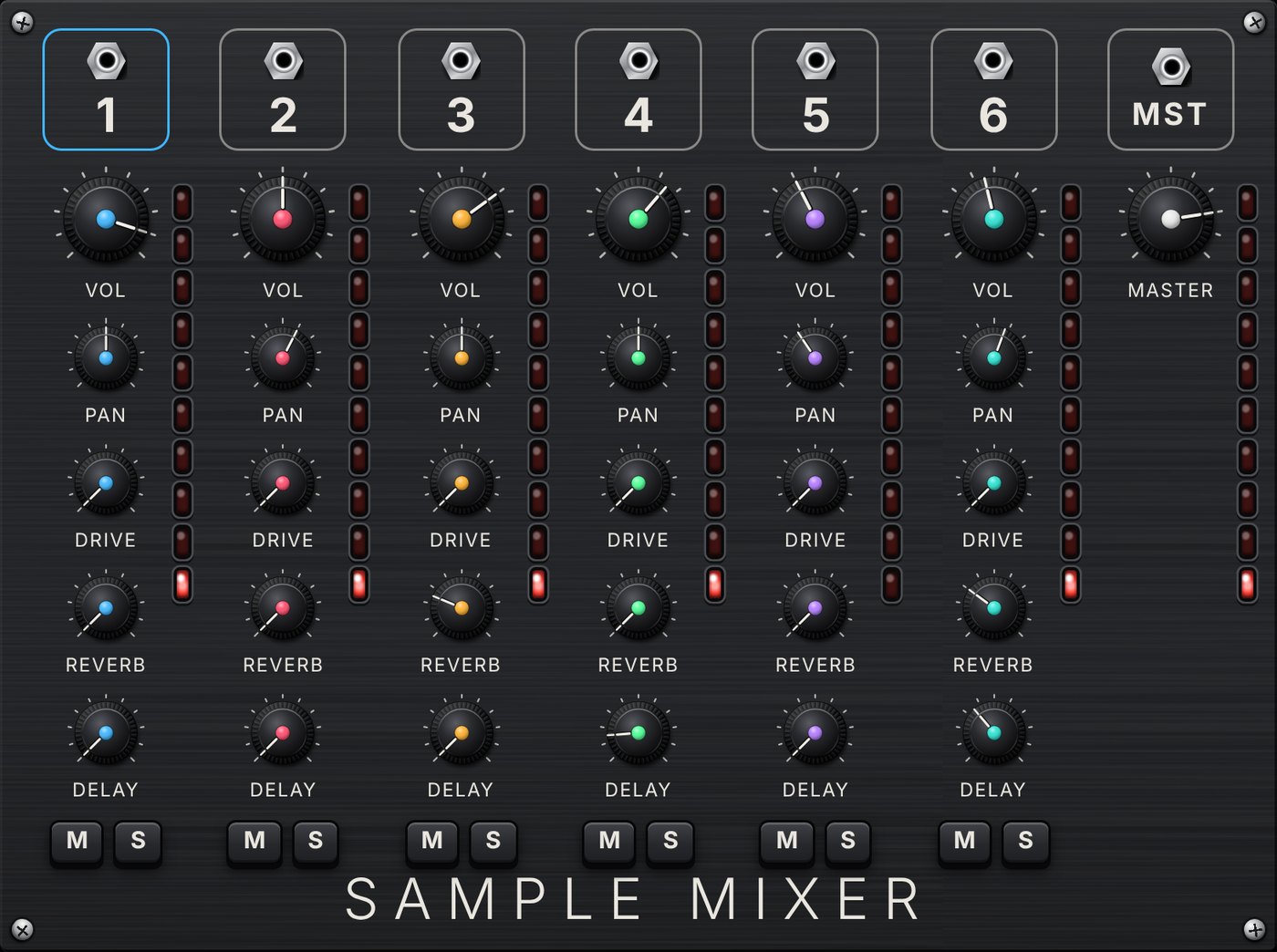
| Strip control | Function |
|---|---|
| Vol | Voice level; also sets the MIDI velocity |
| Pan | Stereo position |
| Drive | Soft saturation before the filter; level is compensated as it rises |
| Reverb | Send to the voice's own reverb |
| Delay | Send to the voice's own tempo-synced delay |
| M / S | Mute (silences at once) and solo |
| MST | Master volume, into a gentle bus compressor |
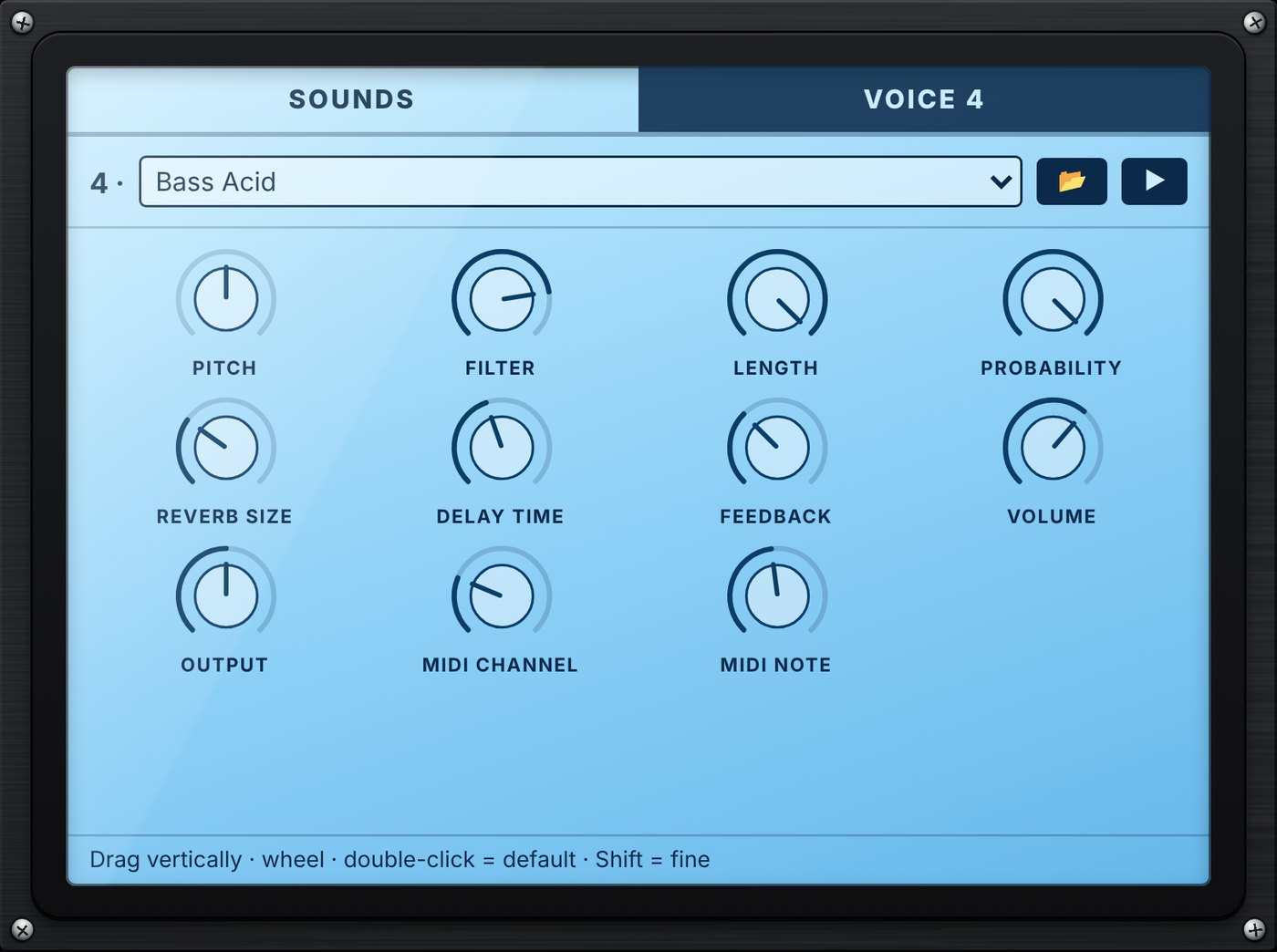
| VOICE control | Function |
|---|---|
| Pitch | ±24 semitones; also changes the length |
| Filter | Low-pass, 60 Hz to 20 kHz |
| Length | Plays 5–100 % of the sample, with a short fade |
| Probability | Chance that each hit plays |
| Reverb size | 0.3 to 6 s decay |
| Delay time | 1/16 to 1/2, triplets and dotted values, synced to tempo |
| Feedback | Delay repeats, 0–90 % |
| Output | Internal, Int+MIDI or MIDI only |
| MIDI channel / note | OFF or 1–16; note 0–127 |
MIDI
Every hit that plays sends a Note On on the voice's channel, with a velocity that follows its volume (100 % = 127). The Note Off follows after 80 % of one step, divider included. Mute, solo, probability and the Start/Stop switch apply to MIDI exactly as to sound, and a voice with no sound still sends notes when its Output includes MIDI. Stopping the transport releases every held note.
In the plug-in, notes go to the DAW and tempo comes from the DAW. The browser edition of HEXARC adds a MIDI CLOCK IN port (24 PPQN, Start/Stop/Continue) and a MIDI OUT port menu; both are hidden in the plug-in.
Presets
Click the PRESET display to pick a preset, or step through them with ◀ ▶. A preset sets tempo, swing, bus mode, the six patterns, sounds and mix, and switches every sequencer to Start. The dice generates random lengths, hits and offsets and keeps sounds and mix.
| Preset | Tempo | Swing | Bus | Character |
|---|---|---|---|---|
| Techno | 128 BPM | 0 % | STEP | Four-on-the-floor kick, acid bass, a 5-step stab driven by the master bus |
| Hip-Hop | 90 BPM | 30 % | CYCLE | 808 kick and bass, fat snare, e-piano chords once per master cycle |
| Ambient | 84 BPM | 0 % | CYCLE | Sub kick, glass pad and vinyl on the bus, bells and kalimba on 11- and 13-step rings |
| Afro Perc | 112 BPM | 12 % | STEP | Congas, cowbell on 12 steps, shaker and clave |
| Electro | 118 BPM | 8 % | STEP | Distorted kick, FM bass, zap on the bus, chip blips with triplet delay |
In a DAW, your own settings are saved with the project.
Controls reference
Every knob works the same way: drag up or down, use the mouse wheel, hold Shift for fine control, double-click for the default value. The value shows under the knob while you hover or turn it.
| Parameter | Where | Range | Default |
|---|---|---|---|
| Tempo | Master board | 40–240 BPM | 120 BPM |
| Swing | Master board | 0–50 % | 0 % |
| Clock | Master board | INT / HOST | HOST |
| Steps | Module | 1–16 | 16 |
| Hits | Module | 0 to Steps | 0 |
| Offset | Module | 0 to Steps − 1 | 0 |
| Div | Module | ÷1, 2, 3, 4, 6, 8 | ÷1 |
| Source | Modules 2–6 | CLOCK / BUS | CLOCK |
| Bus mode | Master module | STEP / CYCLE | STEP |
| Vol | Mixer | 0–100 % | 80 % |
| Pan | Mixer | L100–R100 | Centre |
| Drive | Mixer | 0–100 % | 0 % |
| Reverb / Delay send | Mixer | 0–100 % | 0 % |
| Master | Mixer MST | 0–100 % | 80 % |
| Pitch | VOICE | −24 to +24 st | 0 st |
| Filter | VOICE | 60 Hz–20 kHz | 20 kHz |
| Length | VOICE | 5–100 % | 100 % |
| Probability | VOICE | 0–100 % | 100 % |
| Reverb size | VOICE | 0.3–6 s | 2 s |
| Delay time | VOICE | 1/16–1/2 | 1/8 |
| Feedback | VOICE | 0–90 % | 35 % |
| Output | VOICE | Int / Int+MIDI / MIDI | Int+MIDI |
| MIDI channel | VOICE | OFF, 1–16 | Module number |
| MIDI note | VOICE | 0–127 | 60 (C3) |
Tips and troubleshooting
Tips
- Odd lengths against a 16-step master (5, 7, 11, 13) give patterns that only repeat after many bars.
- Mute the master but keep it on Start to use it purely as a clock for the bus.
- Put a pad on a BUS sequencer with the master in CYCLE mode: it plays once per bar.
- ÷3 or ÷6 against ÷1 and ÷2 voices gives triplet cross-rhythms.
- Lower Probability on hats and percussion for a looser groove; add a little Drive to a kick for weight.
Troubleshooting
| Symptom | What to check |
|---|---|
| Logic: “couldn't be opened”, or HEXARC missing | macOS 10.13+ on Intel, 11+ on Apple Silicon. Install with the .pkg, or remove the quarantine (Installation). Then Plug-in Manager › Reset & Rescan Selection. |
| macOS says the file is damaged or cannot be checked | HEXARC 1.0 is not notarised: right-click the installer › Open. For files copied by hand, run the xattr command from Installation. |
| No sound in the DAW | HOST: start DAW playback. INT: press PLAY in HEXARC. At least one sequencer needs Start, hits above 0 and a sound. |
| One sequencer is silent | Its switch is on Stop, it is muted, another voice is soloed, Probability is 0 %, or Output is MIDI only. |
| A BUS sequencer never moves | The master must be on Start with hits above 0. In CYCLE mode it moves once per master cycle. |
| Window too small or blank | Drag the lower-right corner; the size is saved. On Windows, a blank window means the Microsoft Edge WebView2 Runtime is missing. |
| Basses sound weak | Small speakers cannot reproduce 40–60 Hz; check on headphones or monitors. |
| A sample is refused | Imported samples are limited to 30 seconds. |
Specifications
| Voices | 6 sample voices, one per sequencer |
| Sequencers | 6 euclidean, 1–16 steps, offset, manual step edit |
| Clock | Host tempo and transport, or internal 40–240 BPM; 16th-note steps; swing 0–50 % |
| Divider | ÷1, ÷2, ÷3, ÷4, ÷6, ÷8 per sequencer |
| Master bus | Pulse on every hit (STEP) or every cycle (CYCLE) |
| Sounds | 307 built-in in 12 categories, level-matched; import WAV, MP3, OGG, FLAC up to 30 s |
| Effects | Per voice: drive, low-pass filter, reverb 0.3–6 s, tempo-synced delay with feedback; master compressor |
| MIDI | Note output to the host on 16 channels, one stream per sequencer |
| Output | Stereo or mono |
| Formats | Audio Unit, VST3, Standalone; macOS 10.13+ Intel, 11+ Apple Silicon (universal); Windows 10/11 x64 |
| State | Settings and sample audio saved with the project |
| Version | 1.0.0 |